
Noise free proxy debugger
Choose a device.
Watch only its requests.
Fast guided setup
iPhone & Android capture
Postman export + environments
Share sessions with team
iPhone, Simulator, Android emulator, or this Mac — choose what to monitor at launch. Everything is decrypted and inspected locally. Your traffic never leaves your Mac.
Install via Homebrew
$
brew install --cask prabagaranganesan/tap/proxyhawk
macOS 13+ No account needed Traffic stays on your Mac
NEW API Guard
Backend broke your API?
Know before your users do.
API Guard silently watches every response and learns what "normal" looks like for each endpoint. The moment a required field disappears, a type changes, or array items are missing, you get a BREAK badge — no test suite, no deploy hook, no extra setup.
- Detects removed fields, type changes & array element regressions
- Side-by-side visual diff of stable vs. broken response
- Slack & email alert fires automatically — team knows before users report bugs
- Works on any API — REST, GraphQL, internal services, third-party
-
Hint when a field was likely renamed (e.g. "Was
user_idrenamed touserId?")
Your mock server
Backend not ready? Map Local has you covered.
Map matching traffic to files on your Mac—JSON, HTML, whatever you need. No process to run. No deploy. How Map Local works →
Intercept & edit
Breakpoints
Pause traffic when it matches your rules. Inspect or rewrite headers and body on the wire, then Execute or continue—full control before the exchange completes.
Inside the app
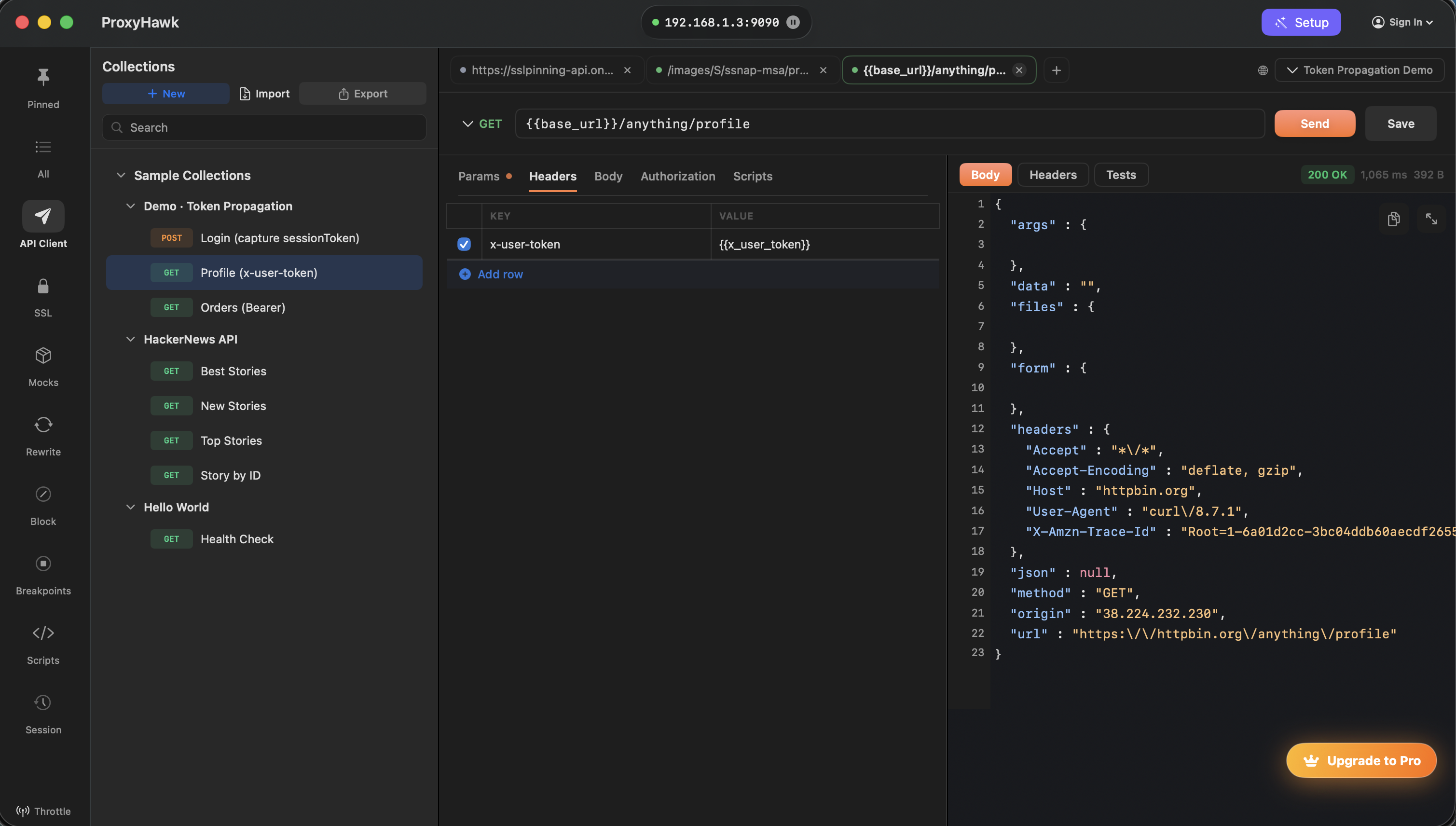
API Client
Open captured requests, edit headers and body, import cURL, and hit Send in the same app. Export traffic as Postman collections with environment variables—base URLs, auth tokens, and custom vars pre-filled, ready to share with your team. Fewer context switches means faster debugging.
Everything in the box
Live HTTPS inspection
See every request and response your app makes, decrypted in real time — iOS Simulator, iPhone, Android, and Mac apps in one list.
API Client + replay
Open captured calls, edit headers and body, and resend right away — no context switch to Postman or Insomnia needed.
Postman export with environments
Base URLs, auth tokens, and variables extracted from real traffic and pre-filled. Import and run — no manual setup.
Breakpoints
Pause any request or response mid-flight, inspect it, rewrite headers and body on the wire, then continue.
Map Local, mocks & block rules
Redirect calls to local files, return mock responses, or drop requests entirely — predictable tests without a staging environment.
New
OpenAPI spec generator
Capture production traffic and export a ready-to-use OpenAPI 3 spec — stop writing docs by hand.
Network throttling & scripting
Simulate slow connections and automate request/response rewrites with scripts — catch edge cases before release.
FAQ
Short answers; details live in the docs.
What is API Guard and how does it work?
API Guard automatically monitors every API response and learns what "normal" looks like for each endpoint. The first time an endpoint responds, ProxyHawk records its structure as the baseline. Every subsequent response is compared against that baseline — if a required field disappears, a type changes, or array elements are missing fields that were always present, you get a BREAK badge in your traffic list immediately. Clicking it opens a side-by-side visual diff showing exactly what changed vs. the last stable response, a hint when a field was likely renamed (e.g. "Was user_id renamed to userId?"), and optionally fires a Slack or email alert to your team. No test suite, no deploy hook, no configuration — it works on any API you capture.
How do I capture traffic from a physical iPhone?
ProxyHawk walks you through it with an in-app guide: install the ProxyHawk CA certificate profile on your iPhone, trust it in Settings, and point your Wi-Fi proxy at your Mac. The guide shows each Settings screen so you're never guessing. Remember to turn the Wi-Fi proxy off when you're done capturing.
Can I export captured requests to Postman?
Yes — and it goes further than other tools. ProxyHawk exports a proper Postman collection with environment variables already generated: base URLs become {{baseUrl}}, auth tokens become {{authToken}}, and custom variables are extracted from real captured traffic. Other proxy tools that offer Postman export give you a flat list of requests — you still have to build environments yourself. See the API Client docs for details.
Do I still need Postman or Insomnia?
Often no for solo debugging—collections and Send are in-app. Teams with collaboration in another client can still export cURL or Postman collections. See API Client.
Is shared session data private?
Yes — and you control what's included. When you share a session, ProxyHawk strips Authorization headers, cookies, and tokens client-side before anything is uploaded. The resulting snapshot contains only sanitized request/response data. Links auto-expire after 7 days and are unguessable. Sharing is opt-in — nothing is ever sent anywhere without you clicking Generate Link.
Where does traffic data go?
Designed to stay on your Mac. Check your build for optional analytics or crash reporting in Security & privacy.
What about certificate pinning?
Pinning blocks MITM by design—you need debug builds or test hooks, same as any proxy debugger. See limitations.
Set up once. Debug faster. Ship with confidence.
Set up capture in minutes with guided device setup, and share sessions with your team in seconds.
macOS 13 or later · Free to try · Pro from $7/month · See pricing →